


Feedback

The "handlers" allow a client to send alert notifications to the specified provider.
The Slack handler allows alerts to be sent to a designated Slack channel. Configuration options include:
| Property | Description |
|---|---|
accessToken
|
The Slack API token used for authentication. |
acknowledgeAlertEnabled
|
Boolean flag to enable/disable alert acknowledgment in Slack. This is by default false since implementation is not done. |
channel
|
The Slack channel ID where alerts will be posted. |
enabled
|
Boolean flag to enable/disable Slack notifications. |
messageIntervalSeconds
|
Interval (in seconds) between alert messages sent to Slack. It should be greater than or equal to the minimum Slack interval in seconds, i.e., 180. |
Before configuring Slack notifications:
To configure Slack notification in the custom JSON configuration file, locate the alertNotificationHandlers section and update the configuration as below.
{
  "environmentWatchConfiguration": {
    "monitoring": {
      "instance": {
        "sources": {
          "certificates": {},
          "windowsServices": {
            "enabled": false,
            "include": []
          }
        },
        "otelCollectorYamlFiles": []
      },
      "installedProducts": [
        {
          "productName": "Agent",
          "sources": {
            "certificates": {
              "enabled": true,
              "include": []
            },
            "windowsServices": {
              "enabled": true,
              "include": []
            }
          },
          "otelCollectorYamlFiles": []
        }
      ],
      "hosts": [
        {
          "hostName": "emttest",
          "sources": {
            "certificates": {
              "enabled": true,
              "include": []
            },
            "sqlServers": {
              "enabled": false,
              "include": []
            },
            "windowsServices": {
              "enabled": false,
              "include": []
            }
          },
          "otelCollectorYamlFiles": []
        }
      ]
    },
    "alertNotificationHandlers": {
            "slack": {
                "accessToken": "Bot User OAuth Token",
                "acknowledgeAlertEnabled": false,
                "channel": "slack-channel-id",
                "enabled": true,
                "messageIntervalSeconds": 60
            }
        }
  }
}
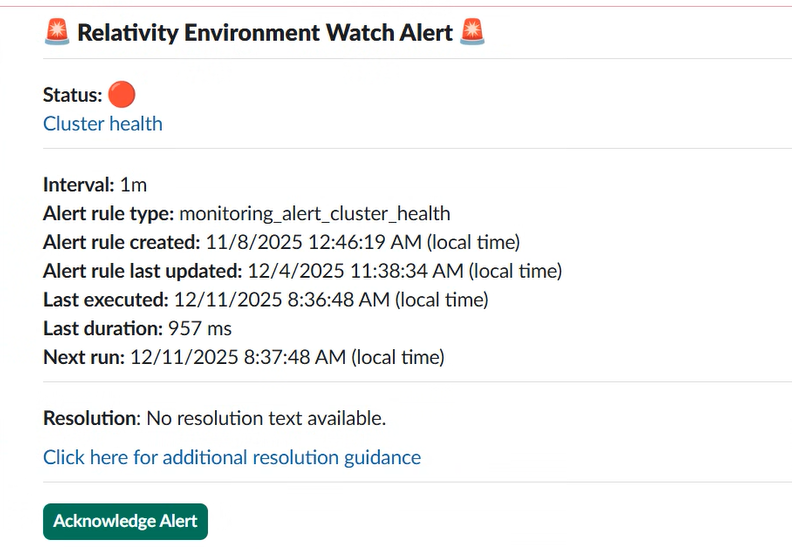
Refer to the Troubleshooting Guide to resolve any custom JSON slack configuration issues.

